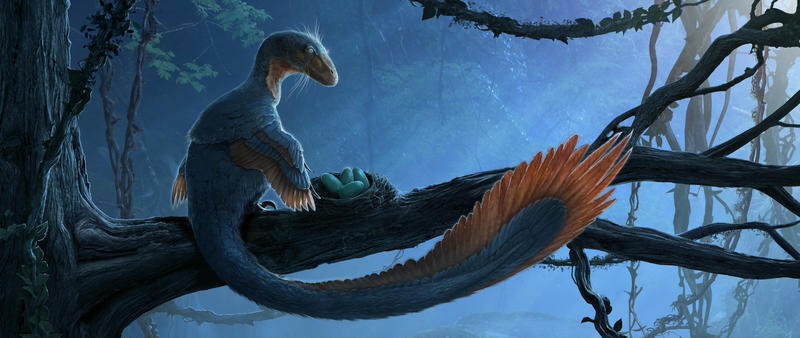
I thought I'd take some time to talk a bit about the world around us. I've come back from KubeCon + CloudNativeCon in Amsterdam super energized and have been taking this week off to recharge and relax.
I'll be talking about Bluefin and friends a bit later - we're gearing up for release and everything is humming along nicely. Let's talk about where we are.
Let's talk about numbers that matter to us. Here's the rollup:
Cloud Native Developer Growth is up to ~20 million developers - This one snuck up on me, since we last reported 15.6 million in November of last year. That's a 28% increase in six months! And 7.3 million AI developers are now working in the cloud native space. Our audience continues to grow.
KubeCon + CloudNativeCon EU hit 13,500+ attendees, not only was it the largest KubeCon ever, but it was the largest open source conference in the world.
First off it means a lot of tired developers. The bootc booths and talks were well attended, and everyone was talking about platform engineering and the challenges of infrastructure at scale. These are the lessons we want to bring into Bluefin and friends, we are a tiny little chicken in a world of giants. We must be crafty and efficient!
I received tons of feedback and "tell your friends hello!", but here's the lessons as I see them:
Our choice of developer tooling and investment in DX is a huge strength - people want standardized tooling across the board.
We will do the same for AI tooling by shipping things like Goose and linux-mcp-server to serve those developers. Everyone is using these tools, and everyone wants these tools in VMs and containers to keep a barrier between these agents and their host. I expect this year will lead to more tooling in this space as developers figure it out.
We will continue to support a distribution-agnostic application store that focuses on meeting the needs of application developers first and foremost.
We've got fancy new testing branches so feel free to help out. I know it's tempting to go right to 50 but if you could give 49 a shakedown on your way there it would really help. We're also wondering when the best time to land 50 would be. Do we wait until Fall to kinda get the -1 feel GTS had or do we pick a happy spot in the summer? Leave your feedback below.
Find your image with a sudo bootc status and you basically adding a -testing to your image name. So instead of bluefin:lts it's bluefin:lts-testing, and so on.
Huge thanks to @hanthor on this one, and if you're as annoyed as I am with those manual branch names you can help just add a toggle to the rebase helper so that we can just have this be a nice testing switch! Once we get that going and add a testing branch to bluefin:stable we'll have a nice easy way for people to opt in and out of testing. Good luck, have fun!
We like to say "The command line is our passion. Therefore we invest in the command line experience, knowing that most people will never see it." Sounds grandiose! Bluefin CLI is a a terminal experience designed around shipping a new "default terminal experience" with modern tools. But it also has things like the just task runner, making the community shared aliases and shortcuts easy. That just lets the good stuff float to the top. Actually we should probably just call it "Bluefin for Mac and Windows", once we have the wallpaper stuff figured out, which is where we need your help!
Bluefin CLI is one of my favorite Bluefin features. I get to host meetings with CNCF Ambassadors and they have the coolest prompt setups, etc. I love checking out a fellow nerd's loadout. You start to find cool little tools that just freshen up the Linux command line experience. And of course they're all written in rust, duh. We've been building bluefin-cli — the opt-in terminal experience that ships with Bluefin — into something that runs anywhere. Today it's available as an early alpha on macOS, any Linux distribution, and Windows via WSL or PowerShell.
This work is brought to you by James, who has been working on this single handedly. In Universal Blue tradition, this feature started off as a meme. Send him a donation if you wanna support his efforts!
On Bluefin, ujust bluefin-cli turns on a curated set of modern command line tools: eza, bat, zoxide, atuin, starship, ripgrep, fd, ugrep, tealdeer, and more. The philosophy is simple — a greenfield terminal experience using the best tools available today, with the ability to toggle it off and return to your known-good kit at any time. That toggle is important because this is an opinionated setup you should be able to turn it off. It's also designed to not be too crazy, we want subtle bling here. And anyway it's a template for you to build off if you want to go customize everything. And we use this system to pull in Flatpaks like Podman Desktop, which is an awesome GUI way to manage your containers. This could all be adapted to bring the same developer experience to other operating systems. "Bluefin the Application" I guess.
Some of Bluefin's best parts are common aliases. I want ujust update and ujust bios in Ubuntu and Windows. PRs to make it nice and slick would be appreciated.
And our community curated ujust bbrew app lists are great, I love it when someone finds a new CLI tool in an exciting space, especially in AI. I learned about llmfit, a nice tool that figures out the optimal local model for your hardware. Knowing that we're all curating awesomeness is a really fun part of this!
I've always argued that the Linux development experience competes best when you do container development. This is the technology that forced Microsoft and Apple to adopt cloud native in the first place. MacOS even has it's own container tool, an analogue to podman. Each OS ships something, and Docker and podman run on all of them. We have a diverse set of implementations, but one common standard. I betcha distrobox would work on that Mac thing if it doesn't already.
There's just something about doing it on Linux, on the platform it was designed for, that leads to that extra bit of user experience. And the one thing I wish more Linux nerds would understand, we live in a cross platform world. Changing platforms is tough enough, let's at least give the developers a comfortable place to land! An operating system agnostic development environment is a competitive advantage when we have home court advantage.
This is an alpha. What we want is for you to be able to have the Bluefin experience on the Mac and Windows, wallpapers and everything. James is almost there, we just need people to give the thing a once over, see what needs to happen. Ideally we want one click happyness for both systems eventually.
bat — cat with syntax highlighting and git integration
zoxide — smarter cd that learns your habits
atuin — shell history sync across machines
starship — fast, cross-shell prompt
uutils-coreutils — Rust rewrite of the GNU coreutils - that's right, before Ubuntu did it lol!
ripgrep, fd, ugrep — faster search tools
tealdeer — fast tldr for quick command references
You can also grab Bluefin artwork and wallpaper collections, browse and install curated Brewfiles via the ujust bbrew command, and run bluefin-cli motd show to get the same Message of the Day that greets Bluefin users at every new terminal.
It can be difficult to keep track of things if you're not paying attention regularly, and even if you are there's always stuff all over the place. I've been working on ways to collate all of the things happening from across the community into a regular monthly report. Here's Jurassic January.
Changelogs are actually pretty weird in bootc land. We usually extract the package version info from the last rechunking step to generate the changelogs - however that doesn't really cover the entire project, just the things in that repository. There's also a new upstream rechunker coming down the pipeline so that means that we'll need to rework how we generate the changelogs (thanks to @renner0e for investigating this!). The existing changelogs also really only tell you about the things in the image, and not the "whole" of Bluefin. These will always continue to be published on changelogs.projectbluefin.io
These reports aren't a replacement for the changelogs, just as this blog will continue to handle most of the "Why?" we do things -- for us it's a good way to blog about the meta and not the minutiae.
We've divided Bluefin into the categories that match the labels throughout the project, so that we can organize things a little bit better. Each section looks like this:
Homebrew packages, AI/ML tools (Bluespeed), and Flatpak applications
Additionally each section is divided into two categories. "Planned Work" are things we're purposely working on. These usually need planning and organization and are tracked in todo.projectbluefin.io.
"Opportunistic Work" are things that people just work on day-to-day and may or may not have a plan attached to them. This is usually the bulk of the work. We also needed a way to track what's going into the production homebrew tap, and in general tell people when something is getting promoted. Here's the first attempt:
We also took the opportunity to add stats on the builders so you can check out Bluefin's health "at a glance". And lastly we wanted to highlight the contributors. New contributors ("New Lights"), will have a gold foil usercard to celebrate their first Bluefin contribution:
Each month will list every person that contributed to Bluefin for that month, so if you're keen, apply within! This section is incomplete, it does not include discussions and issues, so if you're working in those areas you're not getting a shout out yet, but we'll keep making improvements.
If there's an area of Bluefin that you're finding hard to keep track of leave feedback in this thread!
Originally I mostly just wanted to add copilot instructions to the Universal Blue template. Copilot does an awesome job just automating making a custom image so I kept driving in that direction.
If you are making a custom image I want you to try this!
The existing templates mostly let you take Bluefin and modify it. But now with this new OCI layout, we can instead have you assemble your own Bluefin like how Aurora, Bluefin LTS, Bluefin, and dakotaraptor do it. This does a few things:
Let's you be at least as good as any of those right out of the gate, your custom image is built by the production setup that's well known
You can instead work on making the image
All desktop agnostic config is centralized in @projectbluefin/common and set up in a way that you can extend it.
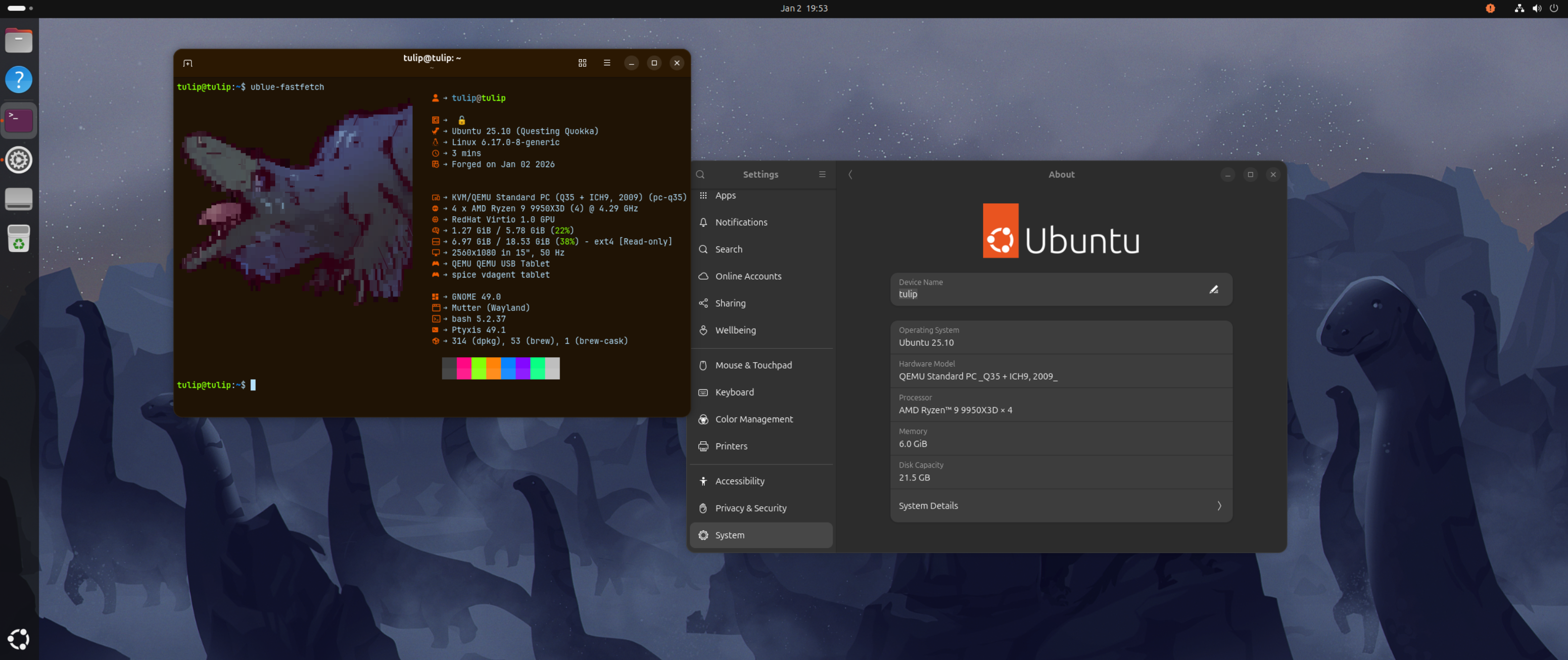
Tulip quickly took the Bluefin containers and a bootcrew ubuntu-bootc image to create an Ubuntu Bluefin.
A ublue-os/base-main base image + cosmic would make a COSMIC Bluefin the exact way we would build one. And as a bonus since the config and stuff is centralized any custom image built by consuming the centralized OCI containers has the benefit of shared maintenance.
Anyway if you're already making a custom Bluefin I'd like to encourage you consuming Bluefin this way, adding the few containers is documented in the README so you don't have to move templates or anything like that, you could probably do this in bluebuild too.
Today we're going to go over some of the things we're finishing up for 2025, and talk about where we're going in 2026. Check out the Autumn 2025 Update and the 2024 update if you want more backstory. We appreciate you joining us on your Linux journey, let's get going!
warning
Bluefin GTS will be merged into Bluefin on the week of March 1st, 2026, see below for more information!
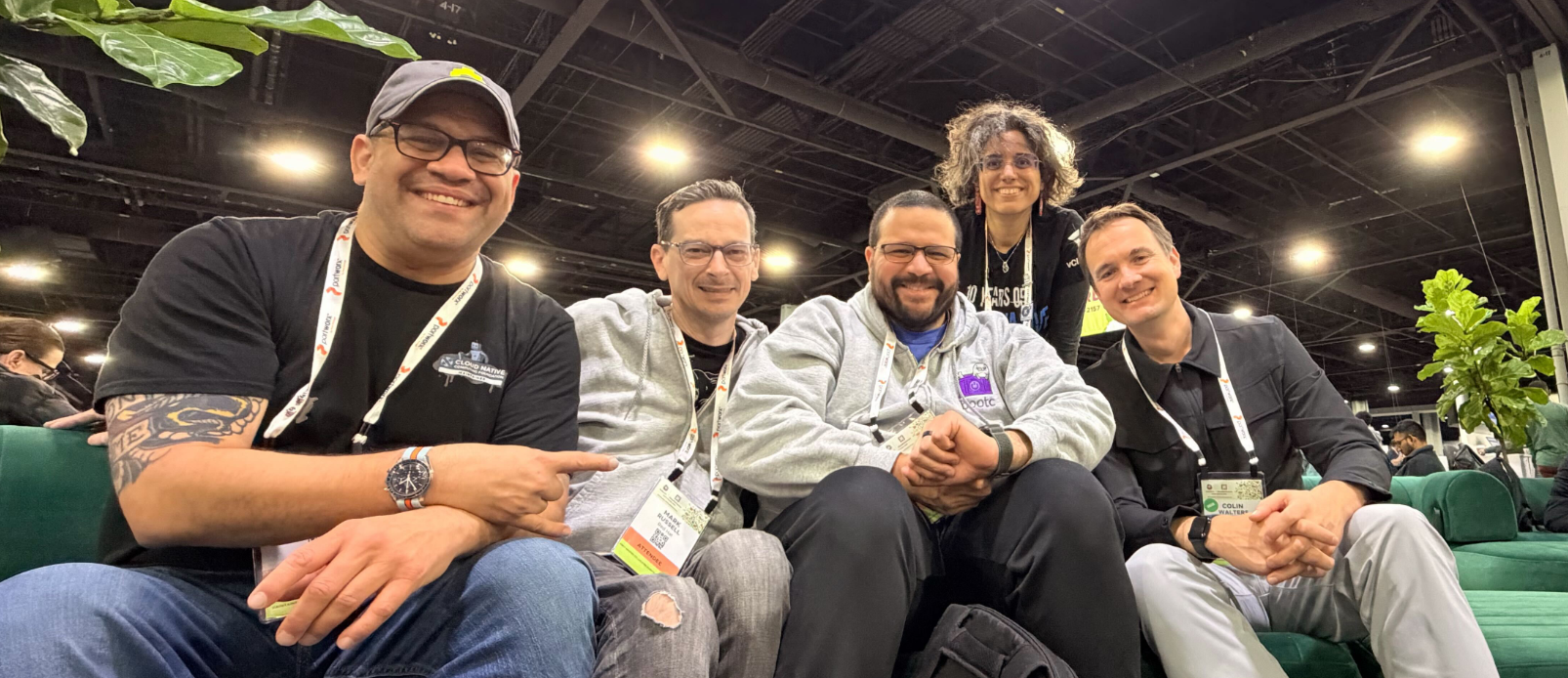
This year we spent most of our time on cleanup and sustainability. Bluefin is mostly feature complete so we don't really ship major user-visible changes as much as we used to. Much of it is "nerd automation" improvements that most of you will never need to actually care about. This has also been a kickass year for Bazzite, which has been a fantastic real-world test for bootc based sytems like ours! Overall the ecosystem is doing well, this year was great for bootc, here's a photo of the team from KubeCon this past November:
Jorge with members of the bootc team: Mark Russell, Joseph Marrero, Laura Santamaria, and Colin Walters
We continue to sync with the various teams at Red Hat as we journey with bootc through its CNCF Project Lifecycle. This works out well for us because we know what we need to do. Our role is to provide an independent voice, and with new orgs like the bootcrew, bluebuild, and secureblue springing up it brings more voices to the choir. 2026 will be the year where we expect participation in bootc to increase. This is also why you've seen us slowly decouple from Universal Blue more explicitly. This is a forcing function to move us away from monolithic "distributions" to an ecosystem full of different images, each with different communities and needs, while retaining the value of shared components.
My 2026 prediction
bootc dramatically drops the barrier to making an OS. We're not here to build a distribution, our purpose has always been to show that you can make operating systems using dockerfiles. That's it (lol). Millions of people know how to do this, the Universal Blue "mission" is pretty much complete. Now we just swim in that merch money and keep the builds green. People are already making a bunch of these based on other distro base images and I can't wait to see what they build. Who knows, there may be another Bazzite out there, let's see who steps up and becomes Legend!
As you'll soon see below, we can source software from anywhere and it's just a bunch of containers. This is reflected in our use of @projectbluefin as our new main GitHub org as we strive to move further away from distribution specific tooling to a cloud-native world.
But that sounds like a bunch of marketing crap, let's explain it ... this update will cover mostly "How Bluefin is made" and where we're hoping to head in 2026.
todo.projectbluefin.io will send you to the project board. Every item in this post will be tracked here. Some of the things in this post are complete, and some are close and need help, feel free to dive in!
You may notice some minor changes (like the motd colors changing), but we're hoping to be complete with the major transitions over the next two weeks. File an issue if you notice something! Exercising the fix-loop with this new architecture will immediately show dividends as we can now ship fixes to all Bluefins and Aurora.
We've also updated the Contributing Guide to reflect Bluefin's updated architecture and processes. Note, Linux nerd stuff incoming:
Bluefin is undergoing a refactor with some significant changes under the hood, which we expect to finish soon, but is mostly there. Some of this isn't done yet, so I'm going to talk about the endstate of where we want to be. Bluefin is a combination of a set of configuration OCI containers which are then shipped on different images. Originally the Bluefin repository had everything we needed, and was a result of organic growth. Everything was built here.
The team drastically refactored this repository in 2025 since it predates the usage of bootc and was falling behind. Similarly, Bluefin LTS was built from the ground up on bootc, but we had to manually bring over the Bluefin parts to build it. We want to share as much code with Aurora and Bazzite as we can. The three projects share many things, but we needed a more efficient way to do this. "One big Bluefin" wasn't going to cut it. So we rearchitected Bluefin to the following model:
These are what make up the bulk of Bluefin and are shipped as OCI containers. This moves us away from classic distro packaging and towards a pure cloud native approach. We're migrating away from the packaging repo and instead keep all the config files in an easy-to-read tree in git, that just gets copied over in the build step:
ujust, motd, service units, GNOME and CLI configuration, application choices, etc. Most things that have to do with the workload should live in this repo
This is shared with Aurora so that we can maintain consistency across images
@ublue-os/artwork - Art assets repository, shared with Aurora and Bazzite
@ublue-os/brew and associated @ublue-os/homebrew-tap - these provide homebrew itself and our selection of custom brew packages. This also simplifies adding homebrew to custom images. Thanks to those of you who have been helping homebrew be better on Linux, it's amazing!
These containers have the advantage of making consumption by other bootc projects trivial and are (mostly) distribution agnostic. Custom images now have a granular option to pick and choose the components they want to ship instead of dealing with one monolithic experience. We've structured the common repository to be extensible, here is how Aurora does it for reference. This allows the team to keep configuration centralized while allowing endpoints for custom builds.
@projectbluefin/distroless - Dakotaraptor prototype - generates a GNOME OS based Bluefin OCI container (more on this below!)
Since the bulk of what makes Bluefin is now just an OCI container the base OS can more easily be abstracted away. This means that these repositories can now do way less than they were doing before. We will continue to prune these over the course of this year.
Decoupling Bluefin this way has already allowed us to delete a bunch of duplicated code, and makes maintenance easier for the team. This also makes it way easier for people to contribute and resolves a bunch of parity bugs between the images. Maintaining Bluefin happens in the common OCI layers and not as much in the image repositories. Custom images will start moving this way too as it let's custom image builders pick and choose from whichever container they want at a much more granular level.
This also gave us the opportunity to clean up a bunch of old justfiles and scripts that have not been looked at for years. Our new justfiles are much smaller and more maintainable. We also took the time to add confirmation dialogs and other quality of life features in there. We have also been taking a less-is-more approach by shipping less customizations as just recipes.
Thanks for your patience with this transition, it did take longer than expected but we took our time since we're planning on long-term maintenance first. This is the smallest that Bluefin has ever been!
As covered in - Streamlining Bluefin Releases we will be merging the bluefin:gts images into bluefin:stable. Effectively we're merging them both.
warning
Bluefin GTS will be merged into Bluefin on the week of March 1st, 2026.
We wanted to commit to a date as soon as we could, and will be moving you to a Fedora 43 base that week. And then everyone will be upgraded to a Fedora 44 base about a month later. Note that this won't be a zero-day upgrade and will follow the usual CoreOS cadence. By then the next -> testing -> stable workflow will be live and you'll be able to opt into the newest versions at your leisure. If this is confusing to you don't sweat it, we'll be more communicative when March rolls around to keep the transition as smooth as we can.
This will also be this single most user-affecting change in Bluefin for 2026, and we're really looking forward to having a proper gitops workflow with testing branches!
Some of you may have noticed parts of GNOME 49 landing in Bluefin LTS. Originally we had planned on backporting GNOME ourselves but this is happening as part of CentOS Stream's lifecycle. This "feels" like a good cadence for an LTS. Here's the lowdown on where LTS is today:
The tuned policy still needs a fix, this makes you have to run a workaround to get power management working on a laptop. This sucks
Many of the inconsistencies will be resolved once Bluefin LTS moves to the common OCI layers
The hardware enablement branch brings in the Fedora kernel so you do have a nice option to not fall too far behind. This has effectively replaced Bluefin GTS by bringing a relaxed desktop upgrade cadence and less regressions overall. The lts-hwe branches also now support secure boot. Despite these papercuts this is the image I use on my work machines, and the new architecture will help here.
Thanks to Sri Ramkrishna for contributing to this section
It is impossible to ignore the fantastic work happening in the the Linux Userspace API (UAPI) Group. Thanks to the work done by the bootcrew and Jordan Petridis it is now possible to decouple Bluefin from a traditional Linux distribution base image entirely and combine both UAPI and bootc approaches into one OS.
This new Bluefin is nicknamed Dakotaraptor and will be our attempt to ship a production quality bootc image based on GNOME OS. This gives us some benefits that we can't get from other images:
Faster deployment of the best tech: systemd-boot, systemd-homed, and other UAPI tech will ship much faster here - we can finally say goodbye to grub forever!
Testing branches with development versions of GNOME so that new contributors can help upstream development
New GNOME and systemd teammates who are committed to driving and shaping the modern Linux desktop. This has been a boon for us since we're forging new working relationships with these upstream projects, and their help will keep us on the leading edge.
More "take charge our destiny" by working with our critical upstreams directly instead of waiting for traditional distributions to catch up
Dakotaraptor will not be for everyone and will offer the least amount of compromises. Not only is local layering unsupported, there's no system package manager at all! We'll be using Buildstream since it's the tech behind this, and you'll hear more about it in 2026 as other projects check it out. This effort is still nascent, so no promises, but it's already got people excited, check it out at @projectbluefin/distroless.
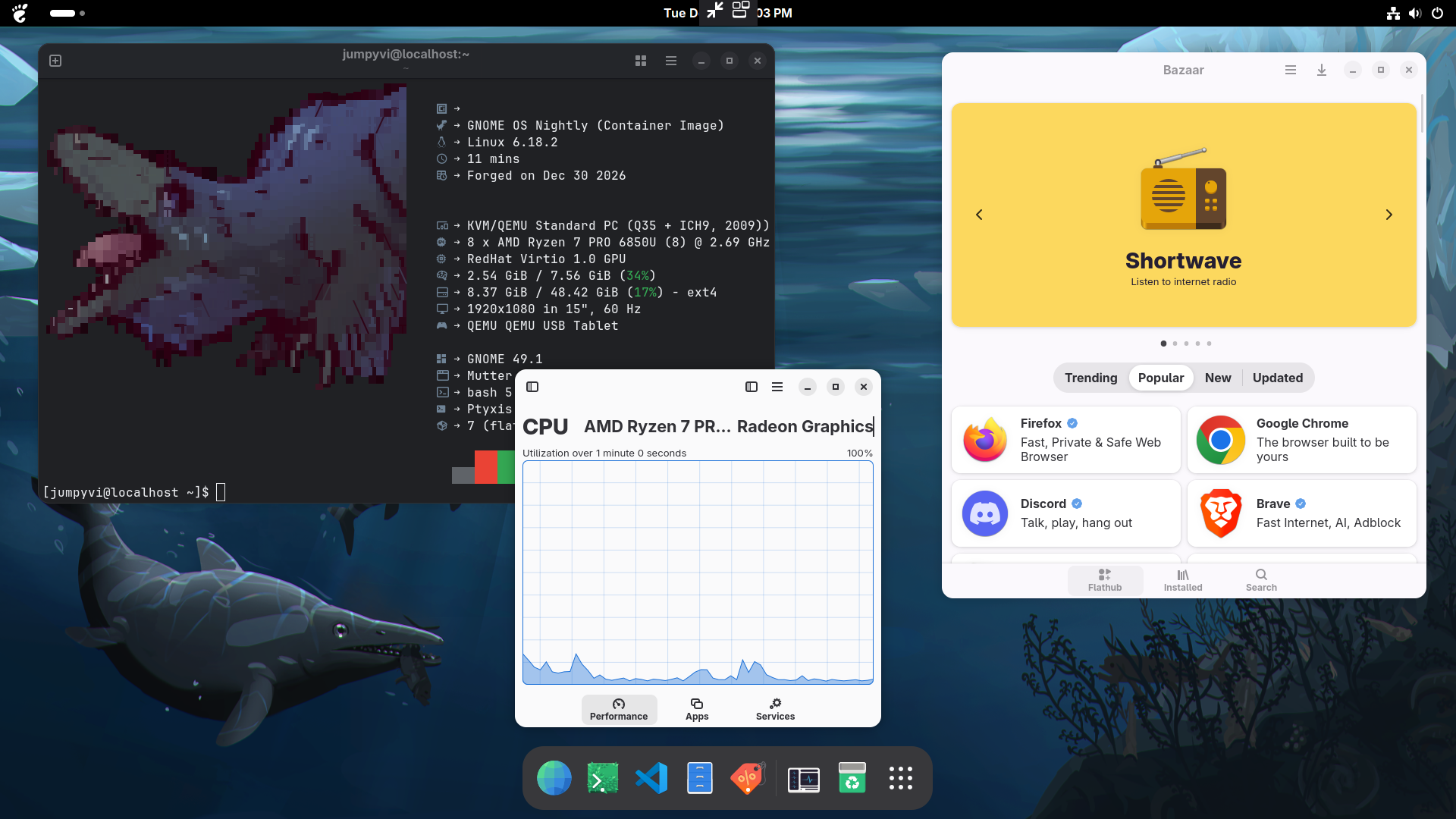
JumpyVi's setup
Don't worry, we won't call it "Distroless".
The other Blufin OCI containers will still continue as before. Dakotaraptor will represent a faster development cycle, directly pulling from upstream, while maintaining production quality. Think of "distroless" as a model flip, the source is the main thing we interact with, the Linux desktop, and that's GNOME. And then we can bolt on whatever kernel we want, with modern Linuxes this is straightforward to make. And since the system libraries for GNOME OS are just ... the Freedesktop and GNOME runtimes, we're running on stuff that's already used by a ton of people. This way of assembly is new, but the payload is not.
That's why we're feeling confident about the quality out of the gate on this one. That just leaves a set of automation scripts and some config files, that's Bluefin!
We haven't yet finalized how next -> testing -> stable will look like, but having the next branch following the nightly GNOME development cadence is a goal. This channel will be our fastest raptor with aggressive component upgrades and no holds barred. The stable branch will be based on the stable GNOME builds and we're hoping to help GNOME maintain these branches. If you want to be part of this effort, now is the time to step up!
Oh, and in order to help us out with this you don't even need to talk to us, just go talk to GNOME directly. "Distroless" means spending more time with the things you love, and not so much time with the delivery service. We're mostly just waiting for GNOME 50 to come out. Expect this one to be VM-only for a while.
About 60% of you turn on Bluefin's Developer Mode. We purposely focus on these 15.6 millions developers and strive to deliver the world's best cloud native development experience.
Now thanks to the efforts from the team homebrew is now in a much better state on Linux, allowing us to reshuffle some things around. In 2026 we will strive to remove the need for a dedicated bluefin-dx image and give you more flexibility moving forward:
IDEs won't be baked into the images so you can use what you want.
Homebrew will continue to be our path forward for IDEs - we hope to drum up interest so that the upstream projects can just "turn on" Linux builds in Homebrew. In the meantime we'll ship the major IDEs we need.
We've added containerd to the base images and will bring Docker in as well so that everything works out of the box, there will not be a need to do the adduser mumbo jumbo, we'll take care of that for you. Research in this area is still ongoing!
How we'll accomplish this transition is still a bunch of guesstimates, so consider this one a slow burn.
Thanks to to Vito Castellano from Bold Brew for continuing to improve the experience! Check out the Bold Brew v2.2.0 post to get more info! We've got all the issues fixed so this menu should work great moving forward. The intent is less stuff baked in, and more options, that you can freely install and remove. Note that these will also all work on any Linux with Homebrew:
The first is our ide selection, which offers a selection of VSCode, Codium, and Jetbrains toolbox for graphical IDEs, as well as nvim, helix, and micro for you CLI nerds.
The experimental-ide selection includes the individual Jetbrains products if you prefer to install those one-by-one, as well as Antigravity and Cursor. These will be promoted to the production tap as we get more feedback. We've also started to add Swift tools into the list so that we can tap into this exciting open source community!
And finally, thanks to our custom tap we are investigating on how to bring bluefin-cli to MacOS, so that you can have these same convenience tools on multiple operating systems. James has a prototype that you can check out.
Our AI toolset continues to expand. I'd like to highlight goose as a tool that I have been really digging into lately. Its donation to the Agentic AI Foundation makes this a great choice for your local LLM/CLI needs.
And here's the stuff that doesn't fit anywhere else in this report!
Consolidated ISOs - we'll be centralizing ISO building into one repository and plan on having regularly refreshed ISOs every month
Powerwash is here! - ujust powerwash is now in alpha and ready for testing - use this command if you want to blow away the data on your PC for donation. This wraps the bootc install reset --experimental command for convenience behind some confirmation dialogs. Be careful with this one! Check the bootc documentation for more info
Actually Going to Market (GTM)
We're almost to the point where we can start to market Bluefin instead of purposely going under the radar
Investigating refreshed video content for the website - this will be expensive so we probably won't look into this until after the user-visible features have landed
On to the numbers! First off let's look at our critical upstreams. This level of growth confirms our decision to trust in systems that prioritize application developers.
As you can see, we not only bet on Flathub, we worked with the folks at Bazaar to ship a pure Flathub experience on our images. If you're looking for one thing to donate to in 2026, please consider donating to Kolunmi - app development on Linux will never improve unless we invest in the application ecosystem directly.
Homebrew Yearly Statistics - Bluefin (#11), Bazzite (#12), and Aurora (#15) have a strong showing in homebrew usage
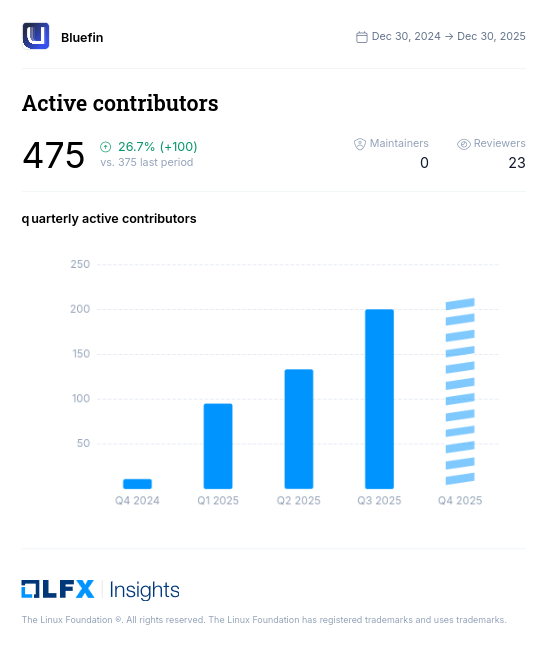
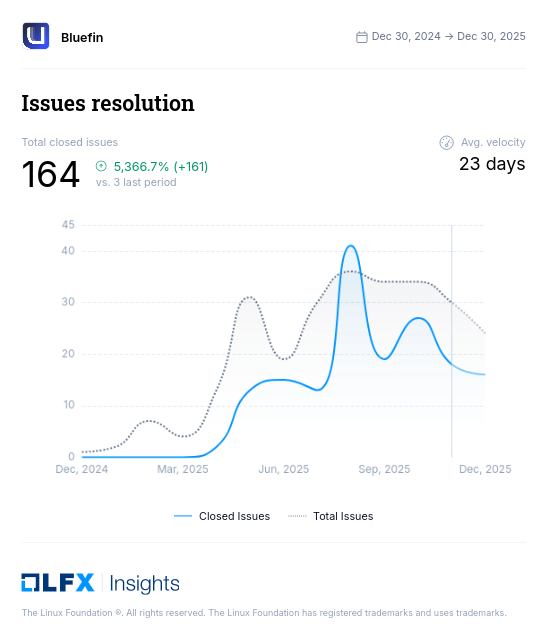
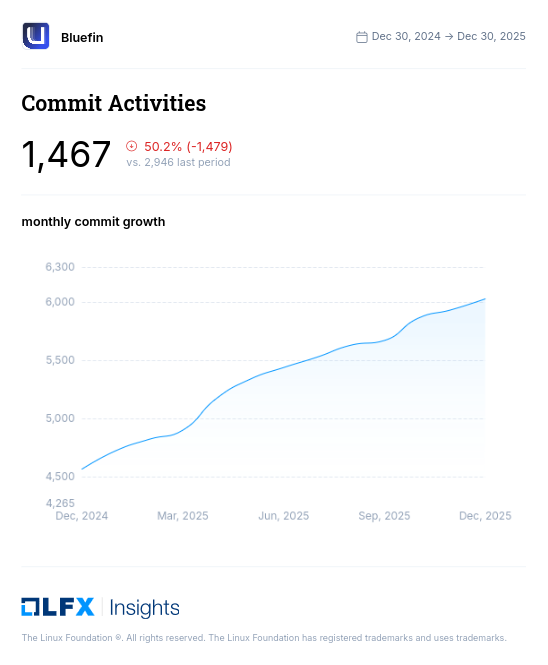
This year we moved to LFX Insights as our platform. Here are our complete contributor metrics and a few charts. You can also always check out all our charts on our Analytics page, where we've finally crossed the 3k weekly users milestone!
I've selected some graphs, feel free to dive in and don't forget to check out Aurora and Bazzite too!
This ended up longer than anticipated, thank you for joining us in 2025, and we look forward to working with you in 2026! And lastly if you've made it this far and still want more backstory, make sure you check out this interview with Michael Tunnell:
We hope that you're enjoying the holidays! We're making some important changes to how Homebrew and command-line tools work in Bluefin. These changes will land in this Tuesday's weekly build.
Homebrew's path will now be placed after the system path. This will cause brew doctor to complain, but we feel that this will lead to a cleaner experience overall. This has been working well in testing, and the change is already on the daily builds if you're using one of them.
Atuin has been causing some issues, so we've disabled it by default to ensure a stable experience with bluefin-cli. We plan to investigate a better integration for Atuin in the future.
We will be publishing a large year-in-review update next week that will cover these topics in much more detail, but we wanted to give you a heads-up on these behavioral changes before they land. In the meantime, we've set up todo.projectbluefin.io for you to follow along with the major changes coming in Bluefin. Thanks!
We've created a new repository to make it much easier to add Homebrew to your custom bootc images. @ublue-os/brew repository provides a pre-packaged OCI container image that bundles everything you need to add Homebrew to your custom image-based systems. This is an evolution of a long journey to integrate homebrew better onto our Linux systems. Instead of manually setting up Homebrew, configuring services, and managing shell integrations, you can now include everything with a single line in your Containerfile.
On first boot, the brew-setup.service automatically extracts Homebrew to /var/home/linuxbrew/.linuxbrew, sets up proper permissions, and makes it ready to use. The image also includes timers for automatic updates and upgrades, keeping your Homebrew installation current.
This removes a bunch of the manual stuff you had to do in your template to get the full thing, now it's much easier and reliable for everyone. Once we're done the container will rebuild after a Homebrew release, keeping us up to date and safe!
Original Bluefin artist Andy Frazer returns with Huntress, a stunning new addition to our wallpaper collection. Following his previous work on Dusk, Andy continues to bring his distinctive paleoart style to Bluefin. We were going for a more weathered Bluefin this time around. No longer the ideal one perched on a rock ... this one has been through some things.
Andy's books make excellent gifts for dinosaur enthusiasts of all ages. Check out his Etsy shop for his full collection of paleoart books and prints.
These wallpapers are available through the @ublue-os/homebrew tap. We've finally solved the teething problems with the tap and we now consider it production ready. You can install them using ujust bbrew and selecting the artwork option: (this is broken right now sorry). We do not yet ship these by default so right now they are opt in:
Regressions suck. And it also sucks finding out where they happened, especially with the power of bootc switch available! What good is a switch if you don't know where to switch to! I hate looking this up by hand, so we whipped this up:
The Driver Versions page tracks kernel, NVIDIA driver, and Mesa versions across all Bluefin release channels. This consolidated view makes it straightforward to:
Troubleshoot driver-specific issues - If a recent update broke something, you can identify exactly which driver version changed
Switch to specific versions - Each release links directly to the GitHub release notes and includes bootc switch commands
Compare channels - See how stable, GTS, and LTS differ in driver versions at a glance
The page includes direct links to upstream release notes for NVIDIA drivers and Mesa, so you can dig into the details when needed.
The Tips and Tricks page has a new refreshed look with extension thumbnails. We haven't touched these in a while, but the reason I was there was to add Copyous to our list of recommended extensions. This thing is so good! It puts a strip of clipboard items on the top that you can summon: